Should I Move Off Wix?
Wix is where a lot of businesses start, and for a good reason. It was built to be one of the easiest ways to get a website up, and it is. You drag things where you want them, they stay where you dragged them, and you can have something published by the end of the afternoon.
The question usually reaches me a few years later. The site has grown a page at a time and there's no continuity, the phone version never quite looks the way it should, and somebody has told the owner they need to “get off Wix.”
If you read my posts on moving off WordPress and moving off Squarespace, you know I think of each platform as a shape. WordPress fits a range. Squarespace has no floor and a low ceiling. Wix has the same low ceiling, plus one thing worth knowing before you either build on it or leave it: the walls don't move. A Wix site can't be taken anywhere else, and it can't even change its own template. That doesn't make Wix a bad choice. It changes what you are actually deciding.
Should I move off Wix?
Sometimes. If you edit the site yourself, it does everything you need, and nobody judges your business by its website, stay. Move when your work is the pitch and the site looks like a template, or when the workarounds have started running the site.
Notice that “Wix is bad for search” isn't on that list. It used to be said a lot, and most of it is out of date. If your Wix site isn't being found, the reasons are usually ones that would follow it to any platform, and moving won't fix them on its own.
What is Wix good at?
Getting a business online quickly, with nothing to maintain. Hosting, the security certificate, platform updates and support all come with the plan, and the editor puts things where you dropped them.
You can try it for free, which is genuinely useful for finding out whether you like building your own site. To run a real business on it you will want a paid plan, mainly so the site lives at your own domain instead of a Wix address; I go through what the free plan really costs in are “free” websites really free?
Like Squarespace, Wix keeps the platform up to date itself. A Wix site doesn't rot when nobody is looking after it, which is more than you can say for a WordPress site nobody has updated in a year. And Wix's App Market means that if you need bookings, a shop or event sign-ups, there is almost always something you can add the same day.
Where does Wix hit its ceiling?
In the same place Squarespace does, the template, plus two places of its own: the phone version of your site, and the apps.
The template. Every Wix site starts from one, and it decides more than the colors. It is the structure that every page you add later has to fit into. On day one it all matches, because it was designed as a set. Then the business keeps going, each new page is added the quickest way the editor allows, and a year or two later the site looks like it was made by several different people. It is the same drift I described in the Squarespace post, and nobody did anything wrong to cause it.
The phone version. In the classic Wix Editor, which most Wix sites are built in, the phone version of each page is laid out separately from the computer version, in its own mobile editor. Rearrange a page on the computer and the phone version doesn't neatly follow along. After a few years of edits, it is common for the phone version, which is where most of your visitors see you, to be the one that has drifted furthest. Wix's newer editor for designers, Wix Studio, handles this better, but it is a separate product, and a site built in one can't be moved into the other.
The apps. The App Market is the best and the worst thing about Wix. Every app is a small piece of somebody else's product placed on your page, with its own look, often its own monthly bill, and its own idea of what a button should be. One or two are fine. A site running a dozen has quietly become a collection of other companies' tools, and the person who knows how they all fit together is usually whoever installed them.
Can I just change my Wix template?
No. Wix doesn't let you switch an existing site to a different template. A new template means building a new Wix site and moving your content across by hand.
This catches a lot of people out, so it's worth saying plainly. You can change colors and fonts across the whole site from its design settings, and that alone can freshen things up a lot. But the layout comes from the template you started with, and by Wix's own help pages a different one means a new site. Your paid plan and your domain can be moved over to it. Your pages can't.
That is the one real difference from my Squarespace advice, where a fresh template and an afternoon is often the answer. On Wix, the cheap fix is a pass over the colors and fonts. Anything past that is a rebuild, even if you stay on Wix.
Can I move my Wix site to another host?
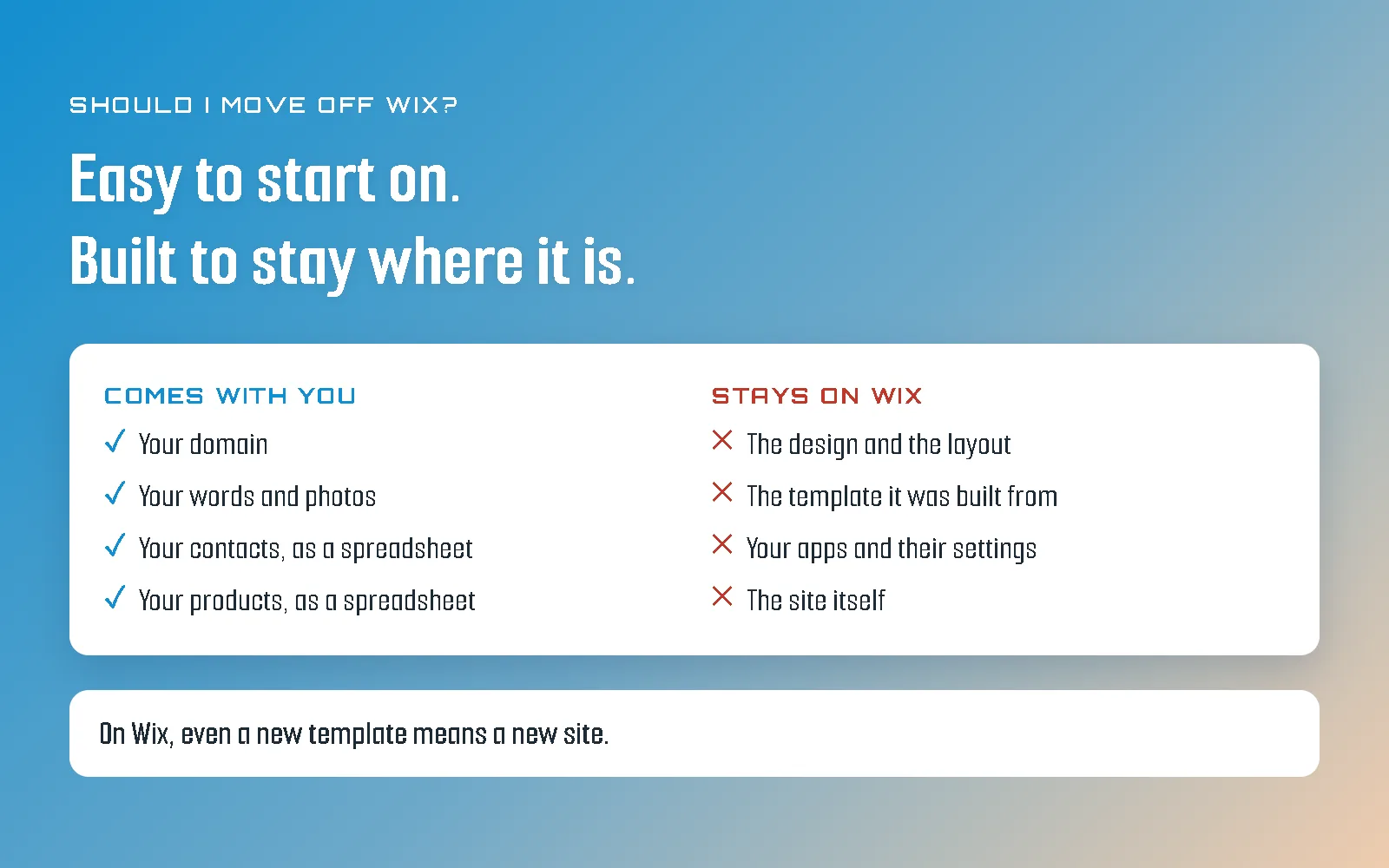
No. Wix's own help center says a Wix site has to run on Wix's servers. You can take your domain, your words, your photos and your lists with you. The site itself, meaning its design and how it is put together, stays.
This isn't a trick, and Wix is upfront about it: your site is built on Wix's own technology and only works where that technology is. It is part of what the convenience costs. I'll give Wix credit for one thing, though. It has started testing a way to export sites built in its newest designer editor, but it is still in testing, it has real limits, and by Wix's own documentation the exported site still loads its fonts, images and business features from Wix. For the Wix site you have today, plan as if only the content leaves.
Here is what that content looks like in practice:
- Your domain. If you bought it through Wix, you can transfer it to another registrar whenever you like, except in the 60 days after you registered it or changed its owner details. That lock is an industry-wide rule, not a Wix one, and in the meantime you can simply point the domain at your new site.
- Your words and photos. These come across by copying them, which is slow but always possible. If you still have the original photos, keep them; they are better than anything you will save back off the site.
- Your contacts. Your customer and subscriber list downloads as a spreadsheet from the Contacts area of your dashboard.
- Your products. If you sell online, your product list downloads as a spreadsheet too, which a new shop can usually take in.
- Your blog. This is the awkward one. There isn't a simple button that hands you every post ready for a new site, so a long blog means copying posts across or using a third-party app to pull them out. It is real work, and worth counting before you start.
What stays: the design, the layout, the template, every app and how it was set up, and any member logins on the site (members of a new site set new passwords).
Check it yourself in ten minutes
You can see where your own Wix site stands from four places, with no code involved in any of them.
One. Your domain. In your Wix dashboard, open Domains. Is your domain there, and was it bought through Wix or connected from somewhere else? Either is fine. What matters is that it is in an account you can log in to yourself. If you're not sure whose name it's in, do I actually own my website? walks through it.
Two. Your apps. Open the list of apps installed on your site and write each one down, along with whether it bills you separately. If there are more than a handful, or some you don't recognize, that is the ceiling being propped up from underneath.
Three. Your phone version. Open your three busiest pages on your phone, with the same pages open on a computer next to it. Is everything there, in an order that makes sense, with nothing overlapping and nothing too small to tap? This is the check Wix sites fail most often, and the one their owners see least, because they edit on a computer.
Four. Your mobile score. Put your busiest page into Google's PageSpeed Insights and read the mobile number. Ignore the rest of the page, which is written for developers and will make any site sound like it is on fire. On Wix, most of that number is decided by Wix, not you. Smaller photos and fewer apps are about where your control ends.
Read the four together. A domain you can reach, a few apps you chose on purpose, a phone version that holds up and a reasonable score is a site to keep. A pile of apps on a site that looks muddled on a phone, for a business whose work is the pitch, is the result that really points at moving.
When does moving off Wix actually pay?
- Your work is the pitch, and the site looks like a template. Architecture practices, art studios, travel companies and venues are judged on taste before anybody picks up the phone. A site that looks chosen rather than made says something they didn't mean it to say.
- The phone version has become a second site. If every change means doing it twice, and the phone version is still the one that looks wrong, you are maintaining two websites for the price of one.
- The apps are running the site. When the booking, the gallery, the forms and the pop-ups each come from a different company, your website is mostly their tools with your logo on top.
- You were about to rebuild on Wix anyway. Because a new template means a new site, a redesign on Wix is already a rebuild. If you are going to pay for a rebuild, that is exactly the moment to ask whether it should be on Wix at all.
Any one of those is worth a conversation. The last one is the most common, and the easiest to miss.
What does moving off Wix involve?
A new design, bringing the content across, somewhere new to host the site, your domain on launch day, and redirects from every old address to its new one.
Start with the domain, and check the 60-day lock before you plan a launch date. If your business email came through Wix as well, find out exactly where it lives before anybody touches the domain, because the domain is what makes your email work.
Then the redirects, which is where moves genuinely go wrong on any platform. Wix gives blog posts addresses with /post/ in them, and the new site won't match those by accident. Every old address needs pointing at its new one, or the search rankings you built on Wix don't come with you. I went through how that works in should I move off WordPress?, and the advice there applies here word for word.
If you want the long version of why I build every site from an empty file instead of a template, it is the case for hand-coded websites, and this is what it looks like as a process. On any exit from a site I build, you get a copy of the site files that any developer can host, which is the one thing Wix can't give you.
The honest answer
Stay if you're happy with how things are now. If you're genuinely content with your site's performance, looks, functionality, and traffic, there's no reason to change anything. Wix is very good at what it set out to do. Move if you want more.
If you're on the fence, send me a message with your domain and the reason that led you to reading this post in the first place. I'll look at it and tell you what I actually see, no pressure.