Should I Move Off Squarespace?
Your Squarespace site looks fine. That is usually the first thing people tell me, and they say it a little apologetically, because something about it still is not right. It looks like a website. It does not look like your business. Or you went to do one specific thing and found the editor simply would not let you.
So, should you move off it? Sometimes. Less often than the people quoting you a rebuild would like, and for different reasons than the ones they usually give.
If you read my post on moving off WordPress, you will know I described that platform as a range with a floor and a ceiling. Squarespace is a different shape, and that is the most useful thing I can tell you about it. Squarespace has no floor. It has a ceiling, and it is lower than most people expect. Whether you should move depends almost entirely on whether your business has hit it.
Why Squarespace is good, and I mean that
Squarespace is the right tool for a simple site that its owner wants to edit, and I would not talk anybody out of it for that job.
Think about what it hands you on day one. Hosting, the security certificate, a domain if you want one, a mobile layout, a form that sends you an email, and templates that look good enough. One login, one bill. Nobody has to install anything, and nothing needs updating, because Squarespace updates the platform itself, for everybody, quietly, in the background.
That last part is the real difference from WordPress, and it is a big one. A Squarespace site does not rot when nobody is looking after it. The platform underneath it never sits waiting for an update, and nobody is ever behind on it. If your site is five pages that change twice a year and you like editing them yourself, you are the customer Squarespace was built for. That is why it has no floor: there is no site too simple for it.
The ceiling is a design ceiling
The ceiling on Squarespace is the template, and you hit it the moment your site needs to look or behave like nobody else's. Squarespace is not built for a dynamic site or an advanced design, and it never claimed to be.
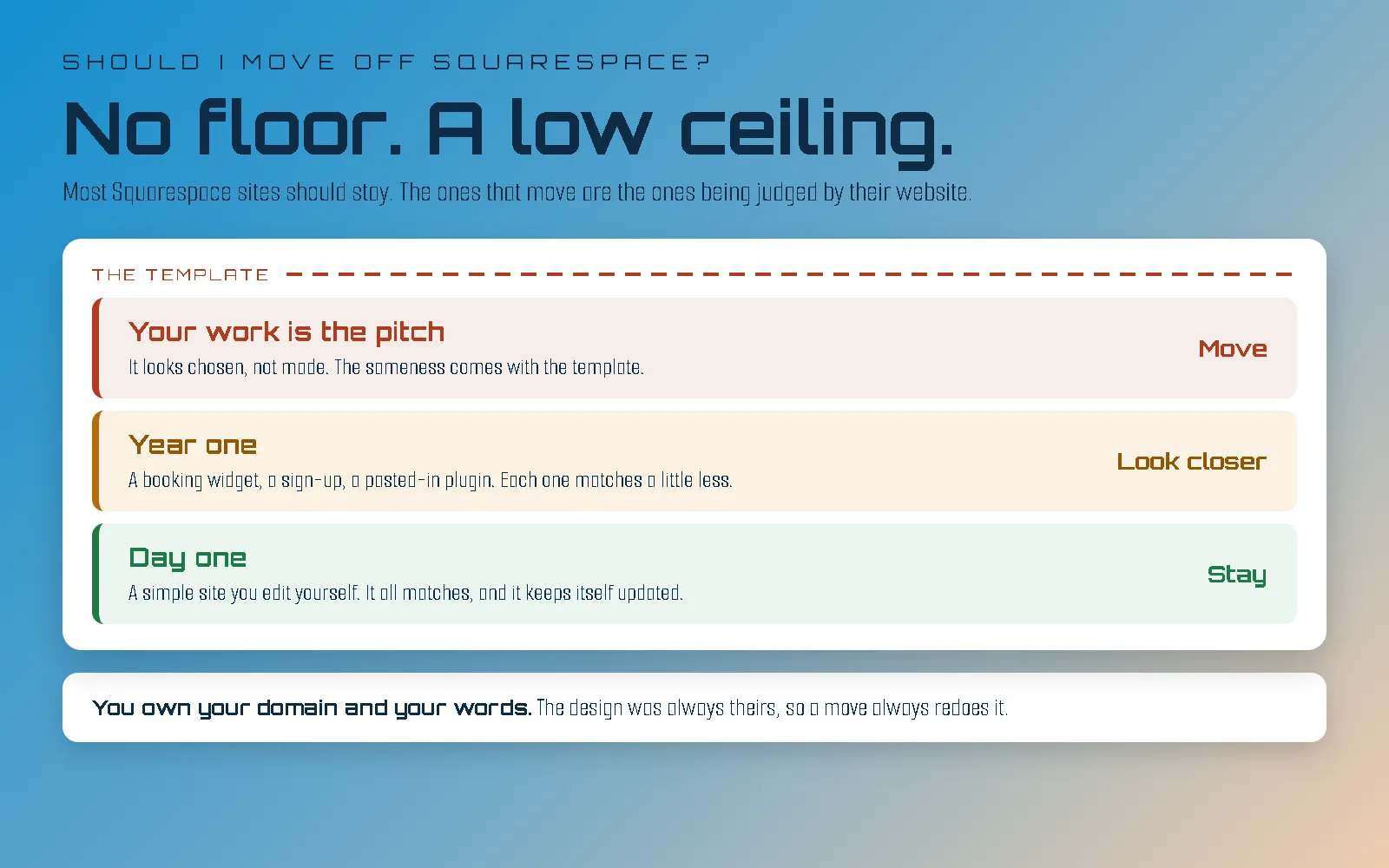
Most people do not hit that ceiling on day one, and that is what makes it hard to see. On day one the site looks fine. The template was designed as a whole, every page was filled in at once, and it all matches. Then the business keeps going. A new service needs a page the template never planned for. An event needs a sign-up. Someone adds a booking widget, a newsletter pop-up, a gallery that works a little differently from the others. Each one is a small project, each one is done the quickest way the editor allows, and each one looks slightly less like the rest.
By the one-year mark, the site is a mess, and nobody did anything wrong. This is the pattern I see most often, by a distance. If a couple of small additions have already made your site look disjointed, you are not approaching the ceiling, you are already hitting your head on it. And it is not a Squarespace problem specifically: I see the same year on Wix and on bought WordPress themes, because every template was designed for the site you had on the day you bought it, not the one you grow into.
Every Squarespace site is built from the same set of sections, arranged in the same editor, by people choosing from the same gallery. The gallery is good, and that is exactly the problem. Your competitors chose from it too. Spend an afternoon looking at sites in your own field and you will start recognising the layouts, then the fonts, then the way the photos fade in, and after that you cannot stop seeing it.
For a lot of businesses that genuinely does not matter. A plumber's site has to be clear and easy to call from, and nobody chooses a plumber by the layout.
But for some businesses, the website is not in front of the work, it is the work. An architecture practice, a landscape studio, an art studio, a venue, a charter company: these are businesses whose clients are buying a judgement about taste before anybody picks up the phone. For them, a site that looks like a well-chosen template says something they did not mean it to say. I'm building a website design for architecture practices and one for landscape architects partly to show what the other side of that ceiling looks like.
The other half of the ceiling is behaviour. Squarespace does what its blocks do. If you want a project page that works differently from the rest of the site, a booking flow your industry actually uses, or a way of showing work that is not a grid and not a slideshow, you are either bending a block into something it was not built for, or bolting something on and hoping it looks like it belongs.
Squarespace does have add-ons, and it is worth knowing the two kinds, because they behave very differently. The first is its Extensions marketplace: approved outside services, mostly for shops and the back office (shipping, tax, printing, accounting), which connect to your site and are looked after by the companies that make them. Those are fine. The second is the one people call Squarespace plugins: snippets bought from independent designers and pasted into your site to make it do something the editor will not. Some are very good. But nobody updates them for you, Squarespace does not vouch for them, and each one is another small project in exactly the pattern above. If your site is running several, that is the ceiling being propped up from underneath.
When staying on Squarespace is the right answer
Stay on Squarespace if you edit it yourself, it does everything you need, and nobody is judging your business by its website. If all three are true, close this tab.
There is a quieter version of this, too. If you have been planning a move because the site feels tired, a fresh template and an afternoon with your own photos may get you most of the way, for very little. Try that first. If it does not get you there, you will know much more precisely what you are missing, which makes any conversation you have next a lot shorter.
A site that works is not a problem waiting to be solved, and I would rather tell you that than sell you a rebuild.
Check it yourself in ten minutes
You can see where your own Squarespace site stands from four places, three of them in your account, with no code involved in any of it.
One. Your domains. Open Settings, then Domains. Is your domain listed there, and does it say it is registered with Squarespace, or connected from somewhere else? If you first bought it through Google, it is very likely here now: Google sold its domain business to Squarespace in 2023 and the domains finished moving across in 2024. Either answer is fine. What matters is that you know where it lives, because that decides who you need on the day anything changes.
Two. Your pages. Count them, and then count the ones you have actually edited in the past year. A small number that you keep current is Squarespace doing its job. A large number you are afraid to open is a different conversation.
Three. Your mobile score. Put your busiest page into Google’s PageSpeed Insights. Read the mobile number and ignore everything else on that page, which is written for developers and will make your site sound like it is on fire. The thing to know is that on Squarespace, most of that number is not yours to change. You can make your photos smaller, and that is about where your control ends.
Four. The list of things you worked around. This one is not a screen, it is a piece of paper. Write down every time you wanted the site to do something and settled for something close. If the list is empty, you are under the ceiling. If the same item has been on it for three years, you are not.
Read the four together. A domain you can find, a dozen pages you keep up, a reasonable score and an empty list is a site to keep. A long list of workarounds on a business whose work is the pitch is the one result that really points at moving.
What you can and cannot take with you
On Squarespace you own your domain and your words, but you rent the design, and that is worth understanding before you decide anything.
Squarespace does let you export your site, and I want to be fair about that. But the export is a file built for importing into WordPress, and by Squarespace’s own description it carries your ordinary pages, one blog with its posts, and the text and images in them. It leaves behind your design and style settings, product, video and audio blocks, store and portfolio pages, any second blog, and anything sitting in a page’s own header or footer. Products can come out separately, as a spreadsheet from the products panel, which is a genuine help if you sell anything.
What that means in practice is that the way your site looks cannot leave Squarespace, because it was never yours to take. It is the template, and the template belongs to them. That is not a trick, it is simply part of what the monthly plan buys. Just know it going in: moving off Squarespace always means redoing the design, even when every word comes across.
The four situations where moving actually pays
- Your work is the pitch, and the site looks like everybody else’s. This is the big one, and it is the one Squarespace cannot fix, because the sameness comes with the template.
- You have started planning around the editor. If “Squarespace cannot do that” has quietly shaped what you were willing to ask for, the tool is now deciding what your business looks like.
- Outside services have taken over. A booking tool, a gallery service, a form service, each in its own box, each with its own monthly bill and its own idea of what your brand looks like. At some point the site is mostly other companies’ widgets with your logo on top.
- You have stopped editing it yourself. The best reason to be on Squarespace is that you can change it on a Sunday night. If somebody else does all the editing anyway, you are paying for a convenience nobody in your business is using.
One of those is worth a conversation. The first one is often enough on its own.
What moving off Squarespace actually involves
Moving off Squarespace means a new design, bringing the words across, somewhere new to host the site, a launch that needs your domain, and redirects. The design is the part you are moving for, so it is not the risky part.
The words are the slow part, as they always are. A move is usually the first time in years anybody has read the whole site from start to finish, and that is when it becomes clear what should not come across at all.
Sort out your domain before anything else. If it is registered with Squarespace, it can be pointed at a new site or moved to another registrar whenever you choose. It is yours. You just need to be able to log in to the account it lives in on the day, which is why it was check number one. If a design company registered it for you on a monthly plan, check whose name it is in; that is the catch I walk through in are “free” websites really free?
Then the redirects, which is where moves genuinely go wrong, on any platform. Every old address has to point at its new one, and Squarespace gives blog posts and gallery pages addresses of its own shape, so the new site will not match them by accident. Miss them and you lose whatever search rankings you had built. I went through this properly in should I move off WordPress, and the advice there applies here word for word.
What you keep no matter what
Your domain is yours and your words are yours, whatever you decide. Move to a site built for you and the design becomes yours as well, and on any exit you get a copy of the site files that any developer can host. That is the one thing a move off Squarespace genuinely adds, so be clear-eyed about whether you need it. If you are not sure which of those are actually in your name today, do you own your website? walks through each one in fifteen minutes.
If you want the long version of why I start every site from an empty file, it is the case for hand-coded websites, and this is what it looks like as a process.
The honest answer
Most Squarespace sites should stay on Squarespace. The ones that should move are the ones whose business is judged by its website, and whose website looks chosen rather than made.
If you are not sure which one you are, send me a message with your address. I will look at it and tell you what I actually see, including the fairly common case where the answer is a new template and an afternoon, not a new website.